

Structured editing
Organize profile data, sections, and templates without turning the resume into a messy document.
No registration. No subscription. Privacy by design.
Create professional resumes with structured editing, selectable templates, live preview, and PDF export. Use ResuLune in your browser or work offline on desktop.
Structured editing
Keep entries, sections, and content tidy instead of wrestling with a blank document.
PDF export
Export clean, readable resumes without rebuilding the layout in another tool.
ATS-friendly
Built around selectable text and a structure screening systems can parse.
Build a polished, ATS-friendly resume with structured editing, selectable templates, and reliable PDF export. Use ResuLune on the web, or choose the desktop app for offline access and multiple saved profiles.
Organize profile data, sections, and templates without turning the resume into a messy document.
Designed around selectable text and clean document structure instead of image-based resume exports.
The desktop version can support workflows where profiles and exports live closer to the user's machine.
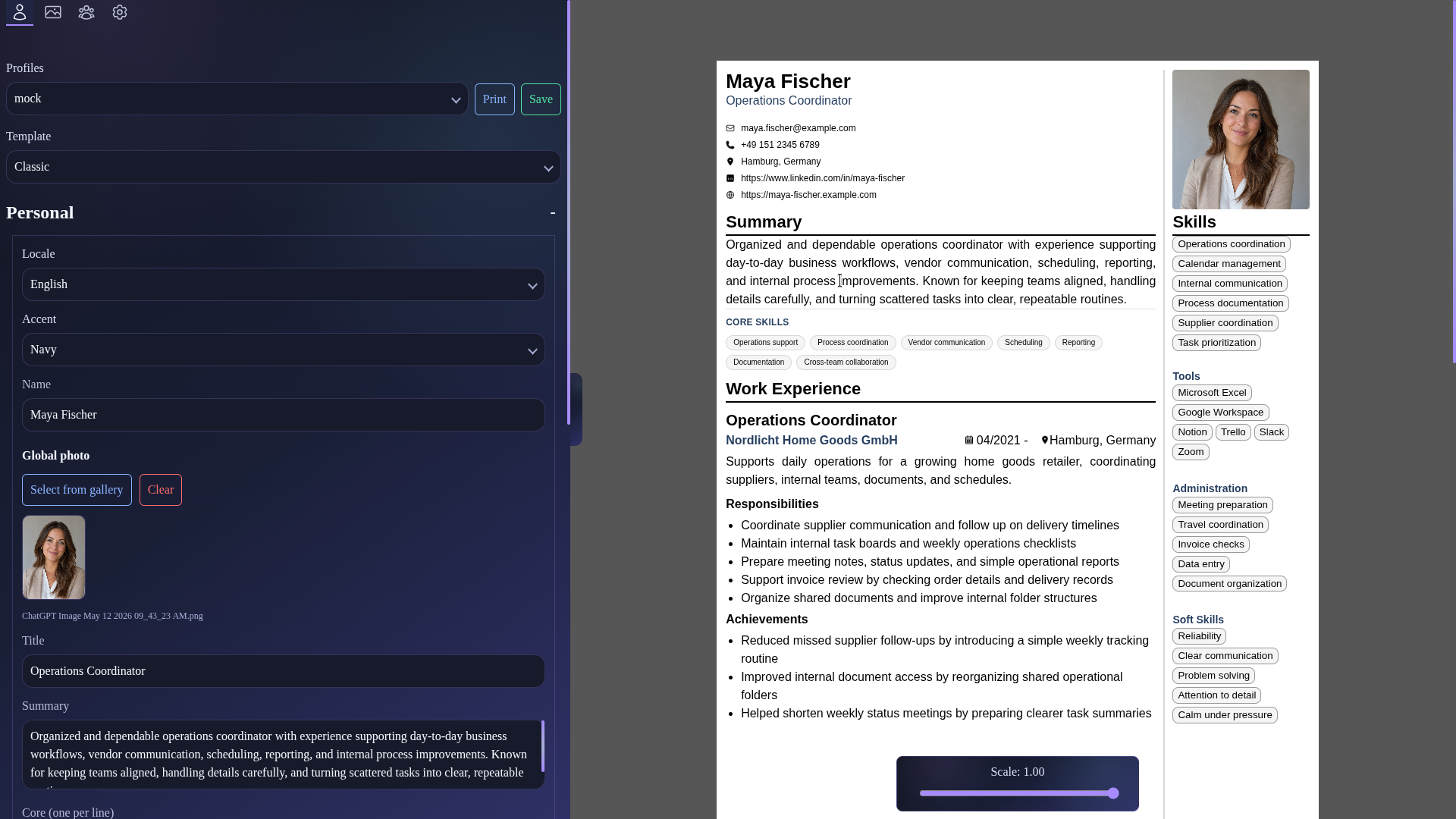
Both editions include the complete resume-building toolkit. Use Web for fast browser access, or Desktop for offline work, multiple persistent profiles, a local image gallery, and update checks.
| Feature | Web | Desktop |
|---|---|---|
| Structured editor & live preview | ✓ | ✓ |
| 7 resume templates | ✓ | ✓ |
| PDF export | ✓ | ✓ |
| 19 interface languages | ✓ | ✓ |
| JSON profile import & export | ✓ | ✓ |
| Custom accent colors | ✓ | ✓ |
| Automatic multi-page layout | ✓ | ✓ |
| Profile photo support | ✓ | ✓ |
| 7-day browser profile save | ✓ | - |
| Multiple profiles | - | ✓ |
| Offline usage | - | ✓ |
| Local image gallery | - | ✓ |
| Automatic update checks | - | ✓ |
Core Web and Desktop releases, expanded templates, interface improvements, and the current language packs are complete. Resume guidance and profile merging are in progress, while image handling is planned for a later release.
A way to help the user to create ResuLune profile file from already existing pdf resume
Technical improvements and maintenance changes
Even more templates are coming.
A friendly image handler to target specific areas
The more people know about it, the more this project can potentially help.
This project is free and will be free forever. Supporting it will make it improve faster and being kept alive.
Niche feature for easier control and Resume generation
Researching the possibilities of asian and arabic languages
Open the web app instantly or download a desktop build for your platform.
Latest checksums
Version: 1.4.0
f67c15d5baadbaa5690ab85fcf5641d1036548acf5972bd3336443566f3667e0
Installer package for Windows desktop users.
Latest checksums
Version: 1.4.0
64ae1574eafb9ef8720a16ef7cb8bd04ee3fb374b60fa557cd56f4cfd19ad197
Desktop build for Linux distributions.
Latest checksums
Intel
Version: 1.4.0
97dc7fc541ec1d4d0b18e7e57468383fa4eda567eb51af995e9c5e163643962c
Apple Silicon
Version: 1.4.0
6a68053daf975e296e8f946de6f36c3fe3a8e331b482834a180a51f2178c087a
Application package for macOS users.
Use ResuLune directly in the browser without installing a desktop build.
By downloading or using the application I accept the terms and conditions .
Yes. ResuLune is free to download and use. The goal is to keep the core app free, including creating, editing, previewing, and exporting resumes. The app is being built as a practical tool first, not as a subscription product. In the future, there may be optional ways to support the project, such as donations or supporter-only extras, but the intention is not to lock the basic resume-building workflow behind a paywall.
ResuLune is currently an early, free release. The app is free to download and use, and the goal is to keep it that way. Windows and macOS may still show a security warning because ResuLune is not yet signed or notarized with paid platform certificates. These certificates cost money and are mainly used so operating systems can verify the publisher automatically. The warning does not necessarily mean the app is harmful. It means the operating system cannot yet verify ResuLune through its official publisher-certification system. If you want an extra validation step, you can compare the checksum of your downloaded file with the checksum published on the official ResuLune checksum page. If the values match exactly, your file matches the published release file. If they do not match, do not open it. For now, only download ResuLune from the official website. If you are not comfortable bypassing the warning, it is completely reasonable to wait. In the future, if optional support or donations make it possible, ResuLune may add official code signing and notarization to reduce these warnings while keeping the app free for users.
A checksum is like a digital fingerprint for a file. ResuLune publishes a checksum for each release so you can compare the fingerprint of your downloaded file with the fingerprint shown on the official checksum page. If both values match exactly, you most likely downloaded the same file that was published on the official website. If they do not match, do not open the file. Delete it and download it again from the official website. You can check the checksum on your own machine with one command: Windows PowerShell: Get-FileHash "C:\path\to\ResuLune-Setup.exe" -Algorithm SHA256 macOS Terminal: shasum -a 256 /path/to/ResuLune.dmg Linux Terminal: sha256sum /path/to/ResuLune.AppImage Each command prints a long string of letters and numbers. Compare that value with the checksum shown on the ResuLune checksum page. They must match exactly.
No. ResuLune is free to use, but it is not currently open source. That means users can download and use the app without paying, but the source code is not publicly available. This may change in the future, but there is no promise or timeline for that right now.
No. Desktop profiles remain on your device. In the Web edition, resume content stays in your browser; if you explicitly choose Save, the profile is kept there for up to seven days. Neither edition uploads your resume to ResuLune for cloud profile storage.
No app can honestly guarantee that. ResuLune aims to produce clean, structured, ATS-friendly resumes, but different companies use different applicant tracking systems, parsing rules, and screening workflows. The best approach is still to keep the resume clear, readable, and relevant to the job.
ResuLune does not upload your resume content to its servers. Desktop profiles stay on your device. In the Web edition, an explicit Save stores the profile only in your browser for up to seven days; it is not sent to ResuLune. For selected website, Web-edition, download, and update requests, the server stores a secret-keyed pseudonymous identifier derived from the network address, approximate country/region/city, and limited event details for up to 90 days. The raw IP address is not written to the analytics database. This information is used in aggregate for security, usage measurement, and decisions about platforms, languages, releases, and infrastructure—not to inspect resume content, advertise to you, or make automated decisions about you.